Install it once. Stay protected.
Your browser is talking to hundreds of parties you've never heard of. Zevr Guard shows you who they are, and blocks the dangerous ones automatically.
Your browser is talking to strangers
— right now.
Behind every page you open, your activity is silently sent to ad networks, analytics firms, trackers — and sometimes, to malware servers.
Every connection,
at a glance.
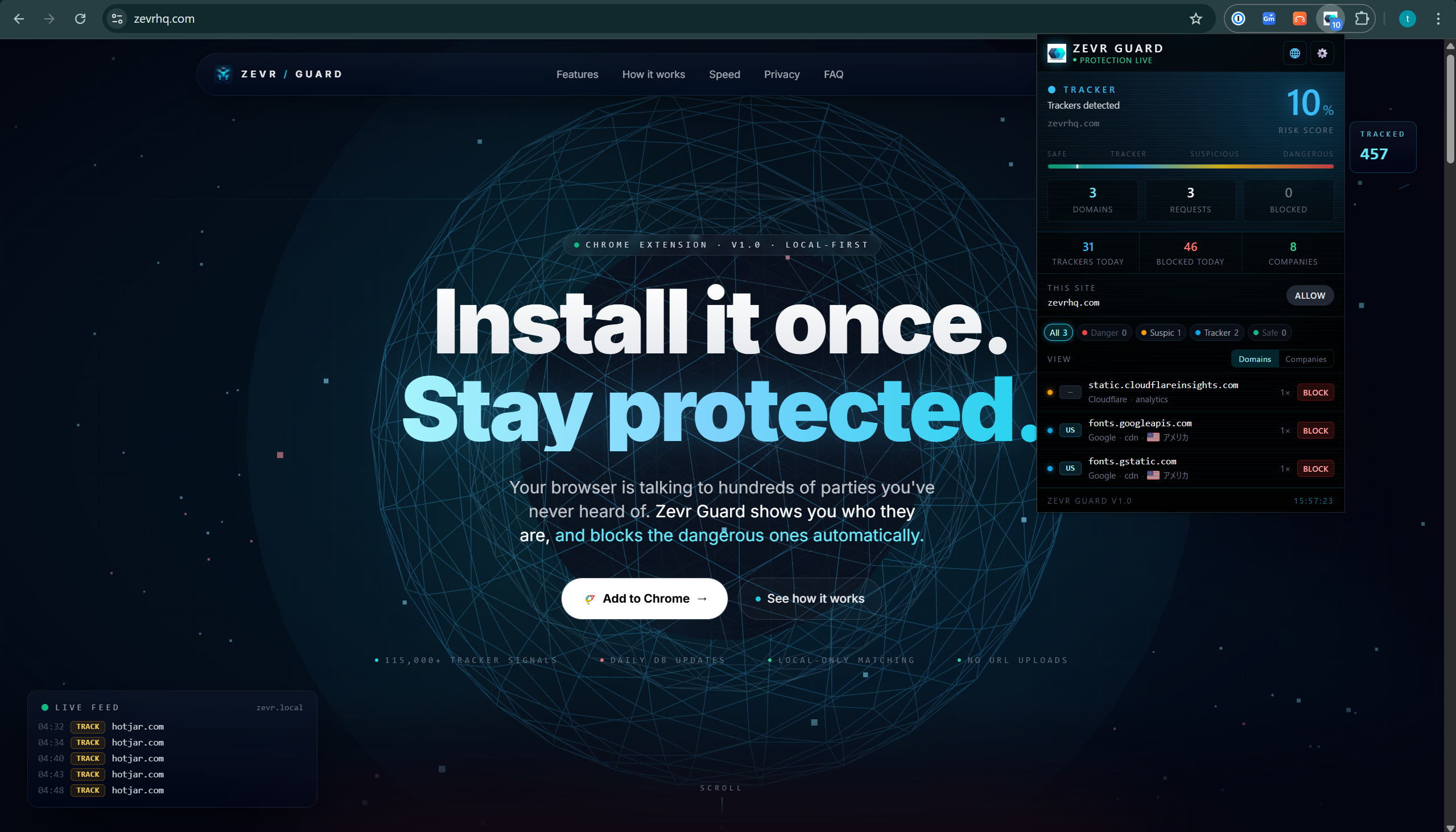
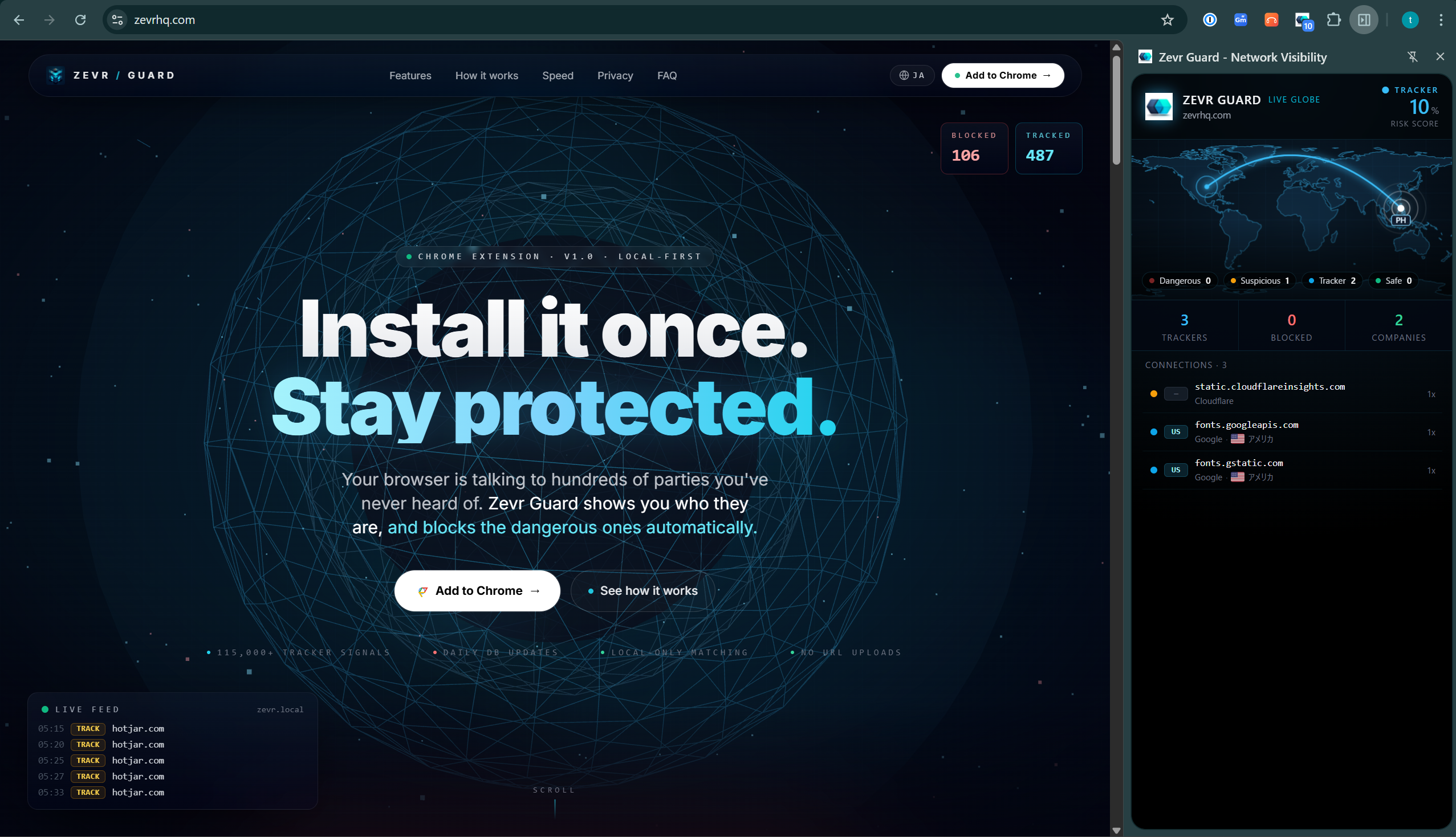
The popup surfaces every tracker in real time with per-domain block controls. The side panel plots every live connection on a world map, coloured by risk.
Five layers of defense,
watching over you 24/7.
Auto-block malware
Known malware and phishing domains are blocked before you can even click. The threat list refreshes automatically every day.
Catch lookalike phishing
Fake domains that imitate real brands — paypa1.com, аpple.com (Cyrillic а), paypal.com.verify-account.net — are detected by on-device heuristics, even before they reach any blocklist.
See every tracker
A database of 115,000+ tracker signals identifies who reaches your browser, how often, and from where.
Warn on suspicious
Ads, analytics, and fingerprinting domains are color-coded. See the real-time tracking density of every page.
Local matching. Your URLs never leave.
Matching runs entirely in your browser. The only outbound traffic is anonymous threat-DB updates from our CDN — your browsing history goes nowhere.
The mechanism is almost comically simple.
- 01
The extension watches your browser
Zevr Guard uses Chrome's declarativeNetRequest API to see every destination domain your browser reaches, in real time.
- 02
Matched against a local database
The threat DB lives inside the extension and is refreshed every day from our CDN. Matching runs locally — your browsing URLs are never sent out.
- 03
Blocked if dangerous, visualized otherwise
Malware is blocked instantly. Trackers are flagged. Safe traffic appears as light on the world map.
Blocking makes browsing
noticeably faster.
Every tracker and ad you stop is a network request, a script execution, and a layout shift you don't have to pay for. On ad-heavy pages, the difference is measured in full seconds.
Fewer requests
Hundreds of third-party calls per page cut down to a handful. Less to wait on, less to fail.
Less JS to execute
Lower CPU load means a cooler laptop, longer battery, and a smoother scroll.
Stable layouts
No more ads popping in mid-read and shoving the content you were reading off the screen.
The tool that protects you
never tracks you.
Zevr Guard never sends the URLs you visit to anyone. The only outbound traffic is a scheduled, anonymous fetch of the threat database from our CDN — the request contains no information about you or the sites you browse.
Quiet defense, at verifiable scale.
A trusted threat database, refreshed daily and matched entirely on your device.
Frequently asked questions
How much does it cost?
A Free plan covers day-to-day protection for individuals — threat blocking, tracker visibility, the world map view, and daily DB auto-updates. Paid Pro and Team plans add advanced features like custom rules, team policy management, and extended telemetry dashboards. You'll only pay if you need those extras.
What about phishing sites too new for any blocklist?
Zevr Guard also runs on-device lookalike analysis: domains that imitate well-known brands — homoglyphs like аpple.com (a Cyrillic а posing as a Latin a), typos like paypa1.com, or embedded names like paypal.com.verify-account.net — are intercepted with a warning even if they were registered an hour ago. The analysis runs entirely in your browser.
Does my browsing data get sent anywhere?
No. The URLs you visit never leave your browser. The only outbound traffic is an anonymous, scheduled download of the threat database from our CDN — the request itself contains no information about you or the sites you browse.
Why a Chrome extension?
Chrome's declarativeNetRequest API lets us stop dangerous traffic at the fastest possible moment — page load. It works from the second you install.
Will it support other browsers?
Chromium-based browsers like Edge work today. Firefox and Safari support is being evaluated.
Will my pages slow down?
Matching takes sub-millisecond time and runs locally. Blocking ads and trackers usually makes pages faster, not slower.
Can I block an entire country?
Yes. On the live world map (or any connection's detail view) you can block every domain that communicates from a chosen country with one tap — useful when a page reaches a region you never expect to. Blocking is enforced locally the moment traffic from that country is seen, and you can unblock a country just as easily. The first request to a new site goes through so its country can be identified; from then on that domain is blocked.
Does it warn me before I enter a password on a risky site?
Yes. When you focus a password field, Zevr Guard warns you if the page is unencrypted (plain HTTP), imitates a well-known brand (a lookalike), or is a site you have never signed into before — all decided on your device, without sending the page anywhere. The warning can be turned off in settings.
How is it different from uBlock Origin or other ad blockers?
Classic blockers are excellent filter engines. Zevr Guard focuses on what they don't show you: a live world map of every connection your browser makes, the company behind each tracker, on-device lookalike-phishing detection, password-entry warnings and one-tap country blocking. It blocks ads and trackers too — and it coexists fine with a traditional blocker if you want to run both.
Is the source code open?
Yes. Zevr Guard is open source under GPL-3.0. The code in the repository is the code that ships in the extension — you can read, audit, and verify every claim on this page yourself. Repository: https://github.com/krystasis/zevr-guard

One click.
A safer every day.
No configuration. Install it, close the tab, and forget about it. Zevr Guard starts working the second it arrives.